Why Offline Transcription on macOS Matters
For Mac users handling sensitive audio — legal consultations, medical interviews, executive strategy sessions, or confidential research — uploading recordings to the cloud isn't just inconvenient. It's a liability.
Offline transcription software for Mac solves this by processing everything locally on your device. Here's why that matters:
Privacy by Design
Your recordings never leave your Mac. No server uploads, no third-party processing, no model training on your data. What happens on your device stays on your device.
No Internet Dependency
Transcribe on flights, in remote locations, or anywhere you work. Offline transcription for Mac means you're not dependent on Wi-Fi quality, VPN connections, or cloud service uptime.
Faster Than Round-Trip Cloud
Modern Macs — especially Apple Silicon models — can transcribe audio faster locally than sending it to a server and waiting for results. No upload time, no queue, no latency.
Complete Control
You decide where files are stored, when they're deleted, and who gets access. No vendor policy changes, no surprise terms of service updates, no locked-in ecosystems.
How Scrieb Works on Mac
Scrieb is designed specifically for macOS users who need offline transcription software that respects their privacy. Here's how it works:
- Download once: Install Scrieb on your Mac. The AI model downloads to your device — no account required, no registration unless you want updates.
- Drop in audio: Record directly in the app or drag and drop existing audio files (any format: MP3, M4A, WAV, etc.).
- Transcribe locally: Processing happens entirely on your Mac using optimized AI models. Nothing is uploaded. Nothing is sent anywhere.
- Export securely: Get transcripts as TXT, DOCX, or PDF. Store them wherever you want. Optional "secure mode" auto-deletes files after export.
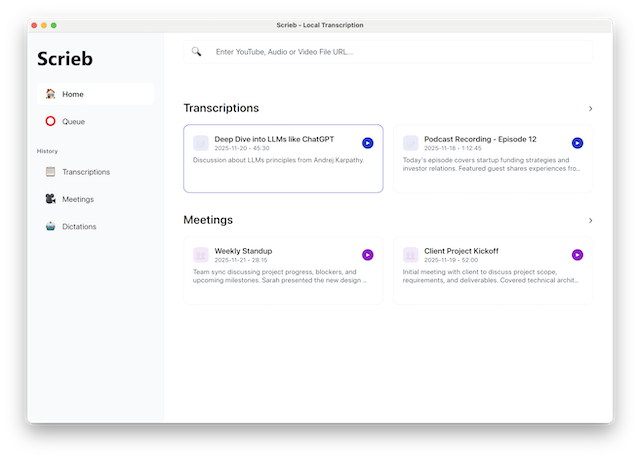
Scrieb uses Whisper-based AI models optimized for macOS. If you have an M1, M2, M3, or newer Mac, transcription is fast. Intel Macs work too, just a bit slower.
Minimum requirements: macOS 12 or later, 8GB RAM recommended. Apple Silicon Macs get the best performance, but any modern Mac will work.
Scrieb vs Cloud Transcription Tools
How does offline transcription software for Mac compare to cloud alternatives?
Who Offline Transcription for Mac Is For
Scrieb is designed for Mac users in privacy-sensitive workflows where audio cannot be uploaded to third-party servers:
Lawyers & Legal Professionals
Transcribe client consultations, depositions, and case reviews without risking attorney-client privilege.
Consultants & Executives
Keep strategy sessions, board meetings, and confidential client calls secure on your device.
Journalists & Researchers
Protect source confidentiality. Transcribe interviews offline without creating cloud trails.
Healthcare Professionals
Designed for privacy-sensitive workflows where patient audio must stay on the device.
When Offline Transcription Might Not Be Right
Offline transcription software for Mac isn't for everyone. Here's when you might want a cloud alternative:
You Have an Older Mac
If your Mac has less than 8GB RAM or is running macOS 11 or earlier, offline transcription will be slow. Cloud tools might be faster in this case.
You Need Real-Time Collaboration
Scrieb is designed for individual professionals, not teams. If you need shared workspaces, live collaboration, or multi-user access, cloud tools are better suited.
You Don't Care About Privacy
If your audio isn't sensitive and you're comfortable with cloud storage, there are simpler (and often free) options. Scrieb is built for people who need privacy by design.
Try Offline Transcription for Mac
Join professionals who keep their audio secure on their devices. No account required to download, no credit card to try.
Get Early Access