Record, transcribe, summarise and search your meetings, calls and interviews. Scrieb runs entirely on your Mac or PC, works offline, and never sends a bot into your call.

Most AI note-takers join your call as a participant. Scrieb records on your own computer, so nobody sees a bot and nothing is uploaded.
“Record from App” captures the call's audio and your microphone on your computer. Works with any meeting app.
Record the microphone only, from the app or the menu bar. Recording is written to disk as it happens, so long meetings are safe.
Drag in MP3, WAV, M4A, FLAC, AIFF, MP4, MOV, WebM, MKV, Opus and more. Scrieb asks what it is and picks the right summary.
Phone voice notes, dictaphone files and quick memos, turned into text and a to-do list.
Apple Silicon and Intel Macs, Windows 10 and 11, and a native build for Snapdragon laptops. One licence covers them all.
Start recording on day one. Anything recorded during setup is transcribed as soon as the models are ready.
Pick a type, or write your own. Summaries come out in the language of the recording, written by a model running on your computer.
Find anything anyone said, in any recording, without your archive ever leaving the computer.
Library search looks through transcripts and summaries, not just titles, and shows the matching passage under each result.
Switch the chat from “This recording” to “All recordings”. The answer names the recordings it used, one click away.
“GMT20261011-093012_Recording” becomes a short title from its summary. Titles you typed yourself are never changed.
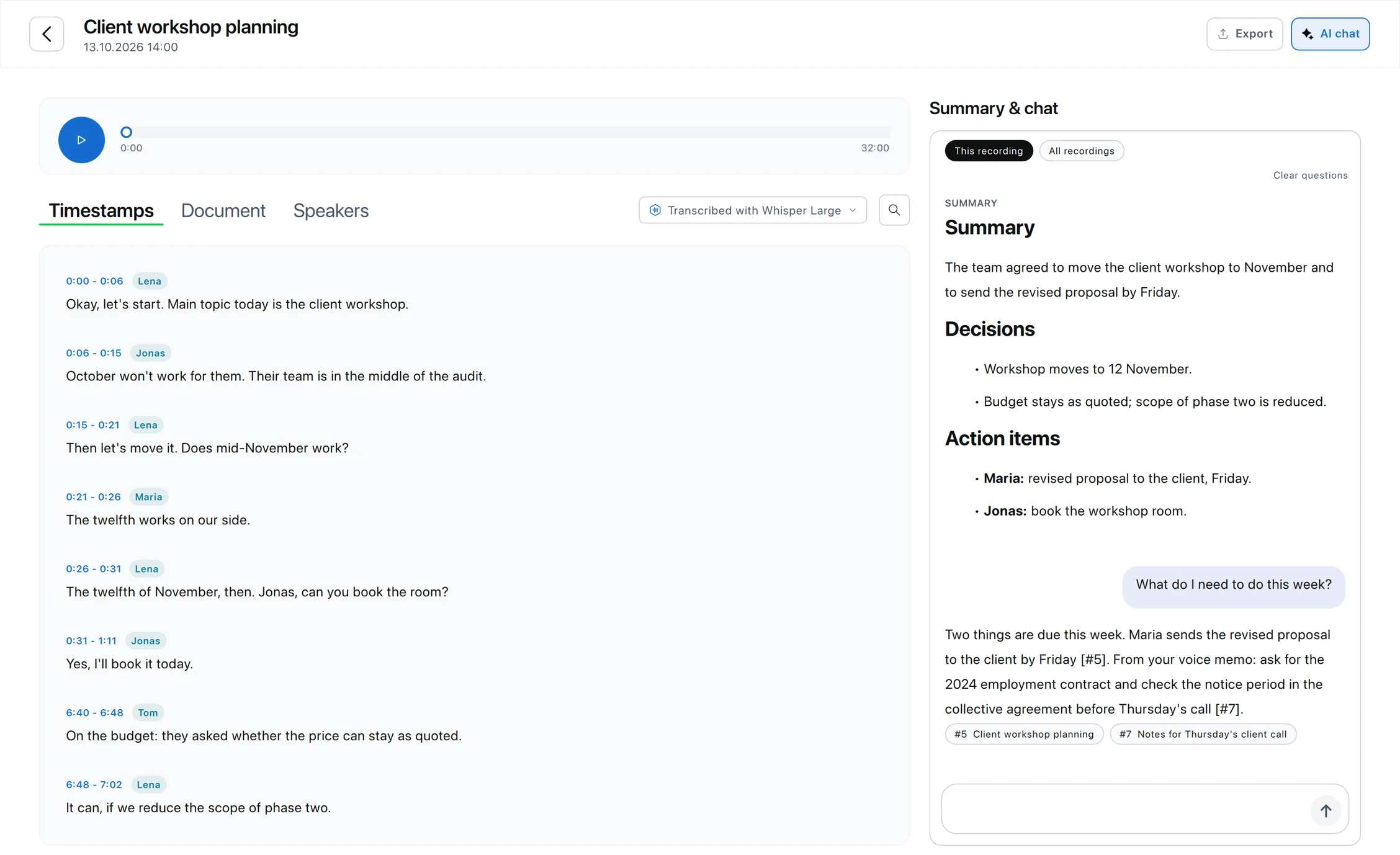
Two things are due this week. Maria sends the revised proposal to the client by Friday [#5]. From your voice memo: ask for the 2024 employment contract and check the notice period in the collective agreement before Thursday's call [#7].
List names, product terms and acronyms, and they are spelled your way in new transcripts.
Whisper Small, Medium or Large v3 Turbo, on the CPU or GPU you choose. Re-transcribe any recording with a bigger model; the old version is kept.
Correct the transcript in the Document tab. Summaries are written from your edited version, so removed names stay out.
Client meetings and dictation, as file notes, with no vendor between you and privileged material.
→Session recordings to notes, with nothing leaving the practice computer.
→Patient conversations transcribed on the device. No business associate for the content.
→Interview summaries with questions by topic and verbatim quotes. DOCX and TXT export for your analysis software.
→Lecture summaries with topics, definitions and what to revise.
→Decisions and action items from every call, searchable across all of them.
→The full data flow and subprocessors are on the security page.
No integrations to grant access to. You decide what leaves the app, and where it goes.
DOCX with speaker names and the summary's formatting.
Plain text or Markdown, ready to import into your coding and analysis software.
PDF for client files, case folders and archives.
“Local transcription software, where no data is sent over the internet or uploaded to the cloud, is urgently needed by many lawyers.”
“The new Offline mode convinced me, so I'm buying an annual licence.”
“Great to hear that the new version now includes speaker identification, chat context, and the stability improvements!”
1 hour of recording per day, with speaker recognition, chat and all export formats included.
Not for you? Email within 14 days of purchase for a full refund.
We set it up with you: model choice, recording calls, summary types and export.
Those services send a bot into your call and process the audio on their servers. Scrieb records on your own computer and does everything locally, so no participant sees a bot and no recording is uploaded.
Scrieb does not join or announce itself in a call. Tell participants you are recording and get consent where the law requires it, just as with any recorder.
Yes. After the one-time model download, recording, transcription, summaries, search and chat all work without internet. Subscribers can switch on Offline mode so Scrieb makes no connections on its own.
Yes. The free plan gives you 1 hour of recording per day, with speaker identification, chat and all export formats. No card needed. Pro removes the limit and covers Mac and Windows with one licence.
Whisper transcribes 90+ languages. Summaries are written in the language of the recording. The app itself is available in eleven languages. Running it on a PC? See Whisper for Windows.
Free to try, no card required. Pro from $24.99/month with no minute limits.
Free to try on Mac and Windows. No account needed to download.
Book a 15-min onboarding call