Why Offline Transcription on Windows Matters
For Windows users handling sensitive audio — legal consultations, medical interviews, executive strategy sessions, or confidential research — uploading recordings to the cloud isn't just inconvenient. It's a liability.
Offline transcription software for Windows solves this by processing everything locally on your device. Here's why that matters:
Privacy by Design
Your recordings never leave your Windows PC. No server uploads, no third-party processing, no model training on your data. What happens on your device stays on your device.
No Internet Dependency
Transcribe on flights, in remote locations, or anywhere you work. Offline transcription for Windows means you're not dependent on Wi-Fi quality, VPN connections, or cloud service uptime.
GPU-Accelerated Performance
Modern Windows PCs with dedicated NVIDIA or AMD GPUs can transcribe audio significantly faster locally than sending it to a server and waiting for results. No upload time, no queue, no latency.
Complete Control
You decide where files are stored, when they're deleted, and who gets access. No vendor policy changes, no surprise terms of service updates, no locked-in ecosystems.
How Scrieb Works on Windows
Scrieb is designed specifically for Windows users who need offline transcription software that respects their privacy. Here's how it works:
- Download once: Install Scrieb on your Windows PC. The AI model downloads to your device — no account required, no registration unless you want updates.
- Drop in audio: Record directly in the app or drag and drop existing audio files (any format: MP3, M4A, WAV, etc.).
- Transcribe locally: Processing happens entirely on your Windows PC using optimized AI models. Nothing is uploaded. Nothing is sent anywhere.
- Export securely: Get transcripts as TXT, DOCX, or PDF. Store them wherever you want. Optional "secure mode" auto-deletes files after export.
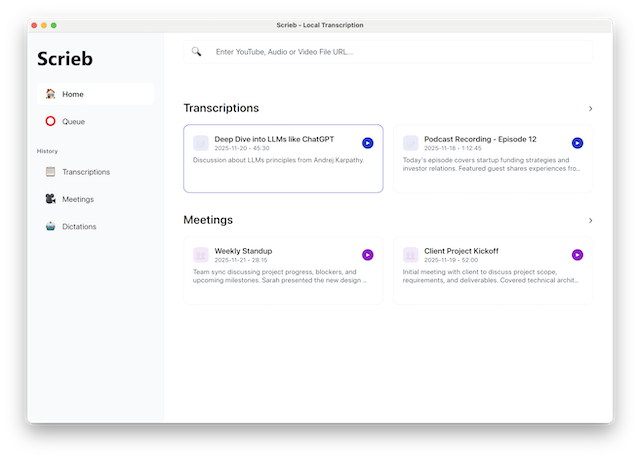
Scrieb uses Whisper-based AI models optimized for Windows. If you have a dedicated NVIDIA GPU (RTX 20-series or newer), transcription is extremely fast. AMD GPUs and modern Intel systems work well too.
Minimum requirements: Windows 10 or later, 8GB RAM recommended. Dedicated GPU strongly recommended for best performance, but CPU-only mode is available for systems without a GPU.
Scrieb vs Cloud Transcription Tools
How does offline transcription software for Windows compare to cloud alternatives?
Who Offline Transcription for Windows Is For
Scrieb is designed for Windows users in privacy-sensitive workflows where audio cannot be uploaded to third-party servers:
Lawyers & Legal Professionals
Transcribe client consultations, depositions, and case reviews without risking attorney-client privilege.
Consultants & Executives
Keep strategy sessions, board meetings, and confidential client calls secure on your device.
Journalists & Researchers
Protect source confidentiality. Transcribe interviews offline without creating cloud trails.
Healthcare Professionals
Designed for privacy-sensitive workflows where patient audio must stay on the device.
When Offline Transcription Might Not Be Right
Offline transcription software for Windows isn't for everyone. Here's when you might want a cloud alternative:
You Have an Older PC Without a GPU
If your Windows PC has less than 8GB RAM and no dedicated GPU, offline transcription will be slow. Cloud tools might be faster in this case. However, any modern gaming PC or workstation will handle Scrieb easily.
You Need Real-Time Collaboration
Scrieb is designed for individual professionals, not teams. If you need shared workspaces, live collaboration, or multi-user access, cloud tools are better suited.
You Don't Care About Privacy
If your audio isn't sensitive and you're comfortable with cloud storage, there are simpler (and often free) options. Scrieb is built for people who need privacy by design.
Frequently Asked Questions
Does offline transcription for Windows work without Wi-Fi?
Yes, completely. Once Scrieb is installed and the AI model has been downloaded to your device, it operates entirely offline. No Wi-Fi, no mobile data, no VPN — nothing. You can transcribe audio files on a plane, in a remote office, or in a secure facility with no network access. The transcription engine runs locally using your CPU or GPU, and results are stored only on your Windows PC.
What Windows versions are supported?
Scrieb supports Windows 10 (version 1903 and later) and Windows 11. Both 64-bit x86 and ARM64 (Snapdragon-based Windows) architectures are supported. Windows Home, Pro, Enterprise, and Education editions all work. We do not support Windows 7 or Windows 8, as the underlying AI runtime requires modern Windows APIs.
What languages can Scrieb transcribe on Windows?
Scrieb supports over 90 languages for offline transcription on Windows, including English, German, French, Spanish, Italian, Portuguese, Dutch, Polish, Japanese, Chinese (Mandarin), Korean, Arabic, Russian, and many more. The multilingual AI model automatically detects the spoken language — you don't need to configure it manually. Accuracy is highest for languages with substantial training data, particularly English, German, French, Spanish, and Japanese.
How fast is offline transcription on a Windows PC without a GPU?
On a modern Windows laptop running in CPU-only mode (no dedicated GPU), Scrieb typically transcribes at 0.5× to 1× real-time speed — meaning a 60-minute recording takes 60–120 minutes to process. With a dedicated NVIDIA GPU (RTX 20-series or newer), this improves dramatically to 5×–15× real-time, so a 60-minute recording is done in 4–12 minutes. AMD GPUs using ROCm and Intel Arc GPUs are also supported with comparable GPU-accelerated performance.
What audio formats does the Windows version support?
Scrieb accepts all common audio and video formats: MP3, M4A, WAV, FLAC, OGG, OPUS, AAC, MP4, MOV, MKV, AVI, and WebM. You can drag and drop files directly from Windows Explorer into the app, or use the built-in recorder to capture audio from your microphone or system audio. The app handles long recordings (multi-hour files) without splitting them manually.
Is Scrieb compliant with GDPR, HIPAA, or similar regulations?
Because Scrieb processes everything locally and never transmits audio or transcripts to any server, it is inherently compatible with data sovereignty requirements. There is no third-party data processor to sign a DPA with, no sub-processors, and no cloud infrastructure to audit. For GDPR purposes, you are the sole data controller and processor. For HIPAA, Scrieb can support compliant workflows since PHI never leaves the device. That said, you are responsible for your own compliance obligations — Scrieb is a tool that enables on-device processing, not a certified healthcare provider.
How does Scrieb compare to Windows built-in speech recognition?
Windows has a built-in voice typing feature, but it is designed for real-time dictation only — it cannot transcribe pre-recorded audio files. It also requires an active internet connection by default (the offline mode has limited language support and lower accuracy). Scrieb, by contrast, works on both live recordings and existing audio files, operates fully offline with high accuracy in 90+ languages, and produces structured transcripts with speaker labels and timestamps. For professionals who need to transcribe meetings, interviews, or recorded audio, Scrieb is a significantly more capable solution.
Try Offline Transcription for Windows
Join professionals who keep their audio secure on their devices. No account required to download, no credit card to try.
Get Early Access